Farm Scene Design Bundle: A Practical Guide for Creators
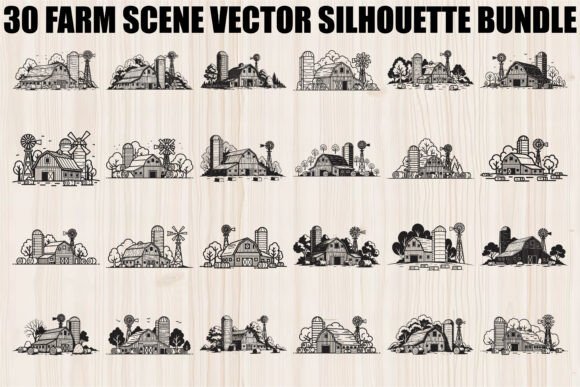
When you browse through digital marketplaces, the sheer volume of agricultural-themed graphics can be overwhelming. You want designs that capture the essence of rural life—the sturdy barns, towering silos, and turning windmills—without the headache of poor file quality or incompatible formats. This is where a curated collection like the Farm Scene Design Bundle becomes essential. It offers 30 rustic designs that blend pastoral charm with agricultural tradition, providing a versatile toolkit for everything from laser cutting to vinyl decals. However, simply buying a bundle isn't enough; understanding how to evaluate and utilize these assets correctly is what separates a professional finish from a frustrating project.
Understanding the Value of Rustic Vector Art
The appeal of farm scene silhouettes lies in their symbolism. Barns and windmills represent tradition and hard work, while rolling countryside landscapes evoke stability and abundance. These motifs are not just decorative; they carry emotional weight that resonates with audiences looking for handmade gifts, boho artwork, or rustic décor. The Farm Scene Silhouette Vector Bundle specifically addresses this by offering clean, scalable vector graphics. Unlike low-resolution raster images that pixelate when enlarged, vectors maintain crisp edges regardless of size. This makes them ideal for large-format wall art, detailed t-shirt prints, or intricate scrapbooking layouts.
For small business owners and freelancers, having a consistent library of high-quality assets saves time and money. Instead of commissioning a designer for every new product line or spending hours tracing rough sketches, you can access a ready-made set of 30 SVG, PNG, JPG, PDF, EPS, and AI files. This variety ensures that whether you are using a Cricut, a Silhouette Cameo, or professional design software, you have the correct format at your fingertips.
Common Pitfalls When Choosing Digital Assets
Even experienced creators make mistakes when selecting digital bundles. One of the most frequent errors is assuming that "vector" automatically means "cut-ready." While the Farm Scene Design Bundle provides clean paths, some users neglect to inspect the individual layers before starting a cut job. If a design contains overlapping nodes or stray anchor points, your machine might struggle, leading to wasted vinyl or uneven laser cuts. Always open the SVG or AI file in your editing software first to verify the integrity of the lines.
Another common misunderstanding involves file formats. Beginners often download only the PNG version because it is easy to view, forgetting that PNGs are raster images with fixed dimensions. If you plan to print a large poster or a mug wrap, a PNG might look blurry if it lacks sufficient resolution. The Farm Scene Silhouette Vector Bundle includes high-resolution JPGs and transparent PNGs, but for any project requiring scaling, you must prioritize the SVG, EPS, or AI files. Ignoring this distinction can ruin the presentation of your final product, making a simple logo look amateurish.
Avoiding Compatibility Issues
Software compatibility is another area where projects stall. Not all cutting machines handle every vector format equally well. For instance, while Cricut Design Space loves SVGs, older laser engravers might require DXF or specific PDF settings. Although this bundle covers the major bases with 30 files in each of six formats, failing to match the file type to your specific hardware can result in import errors or distorted shapes. Before purchasing, check your machine's documentation to ensure you can utilize the included formats effectively. This simple step prevents the frustration of buying a bundle you cannot immediately use.
Maximizing Your Creative Output
To get the most out of the Farm Scene Design Bundle, consider how you apply the designs beyond standard applications. Many users limit themselves to simple t-shirts or stickers, missing opportunities for more complex projects. For example, the silhouette style works exceptionally well for layered wall art. By cutting the same design in different wood thicknesses or colors, you can create depth that flat vinyl decals cannot achieve. Similarly, the clean lines of the hay bales and trees make them perfect for embroidery digitization, provided you adjust the stitch density appropriately.
Entrepreneurs should also think about branding consistency. Using a mix of random farm clipart can dilute your brand identity. Instead, treat the 30 designs in this bundle as a cohesive system. Use the windmill motif for your logo, the barn silhouette for packaging labels, and the landscape elements for social media backgrounds. This approach creates a unified visual language that feels professional and intentional. The versatility of the bundle allows you to expand your product line without compromising on aesthetic quality.
What to Check Before You Download
Before finalizing your decision to use or purchase the Farm Scene Design Bundle, take a moment to verify a few key details. First, confirm the license terms. Are these files intended for personal use only, or do they allow for commercial products? If you are running a shop selling mugs or posters, you need a commercial license to avoid legal issues. Second, review the preview images carefully. Look for closed paths; open paths in a silhouette will cause your cutter to wander off the mat or your printer to bleed ink into unwanted areas.
Finally, test one file before committing to a full production run. Cut a single design on your actual material to check alignment and speed settings. Even the best vector files may require minor adjustments depending on your specific blade pressure or laser power. By taking these precautionary steps, you ensure that the Farm Scene Design Bundle serves as a reliable foundation for your creative endeavors rather than a source of technical headaches.
Building a Professional Workflow
Incorporating these rustic designs into your workflow requires organization. With 30 distinct files across multiple formats, it is easy to lose track of which version is optimized for which task. Create a folder structure that separates the SVGs for cutting, the EPS/AI files for professional editing, and the PNG/JPG files for quick mockups. This organization streamlines your process, allowing you to focus on design rather than file management.
Remember that the goal of using a bundle like this is efficiency and quality. The Farm Scene Silhouette Vector Bundle offers a robust collection of agricultural traditions captured in modern digital formats. By avoiding common pitfalls regarding file types, software compatibility, and testing procedures, you can leverage these assets to create meaningful, high-quality products. Whether you are crafting invitations, designing logos, or building a line of handmade gifts, the right preparation turns a simple download into a powerful creative tool.