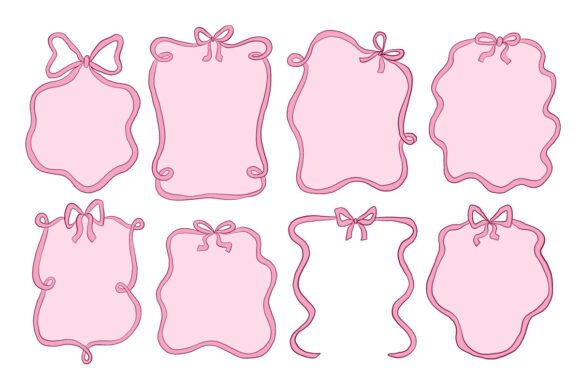
Cute Pink Ribbon Frame Label Element Set: A Practical Guide to Elegant Design
Creating visually appealing invitations, greeting cards, or branding materials often feels like a balancing act between creativity and technical precision. The Cute Pink Ribbon Frame Label Element Set offers a solution for designers who want to inject charm and softness into their projects without starting from scratch. This collection features a charming set of pink decorative frames adorned with ribbon bows in a soft and playful style, specifically crafted to highlight text and create elegant compositions. However, simply downloading a graphic pack is not enough to guarantee a professional result. Many creators overlook critical details regarding file formats, color consistency, and layout integration, which can turn a promising design into a disjointed mess.
Understanding the Value of Decorative Frames
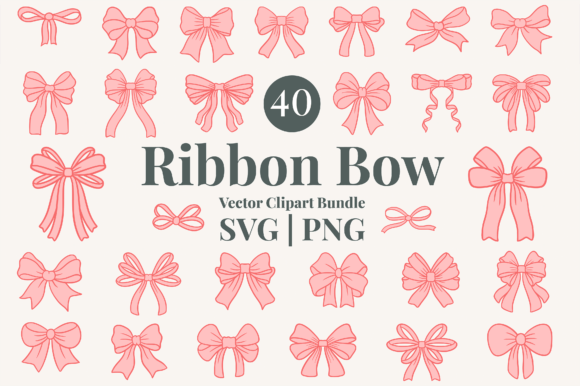
The appeal of this element set lies in its versatility. Each element is crafted with smooth curves and delicate details, making them ideal for invitations, wedding designs, baby-themed layouts, and decorative branding materials. For entrepreneurs and small business owners, these pre-made assets save hours of vector drawing time. Instead of struggling to draw a perfect bow or a symmetrical border, you can focus on your message and overall brand narrative. The consistent ribbon accents add a cohesive and stylish look across all elements, ensuring that whether you are designing a single postcard or a full suite of stationery, the visual language remains unified.
Yet, the true value of the Cute Pink Ribbon Frame Label Element Set is only realized when used correctly. It is designed to be easy to customize and combine, allowing flexible arrangements for both minimal and detailed layouts. When applied thoughtfully, the soft color palette enhances visual appeal for both digital and print use. But when rushed or misunderstood, these same assets can lead to common design pitfalls that undermine the quality of your final product.
Common Mistakes When Using Digital Asset Packs
One of the most frequent errors beginners make is ignoring the specific file formats provided. This product consists of SVG files for scalable editing, PNG files with transparent backgrounds, EPS files for professional design use, and JPG files as previews. A novice designer might rely solely on the JPG preview images because they are familiar. This is a significant mistake. JPGs are raster images; if you stretch them to fit a large banner or a high-resolution print job, they will pixelate and lose clarity. To maintain crisp edges on those delicate ribbon bows, you must utilize the SVG or EPS files.
Another overlooked detail is color management. The "soft pink" in the preview might look different on your screen than it does on a printed card due to RGB versus CMYK color profiles. If you are printing physical invitations, relying on the default RGB colors from a PNG file can result in a muddy or dull pink that lacks the vibrancy seen on your monitor. Professionals know to convert the vector paths in the SVG or EPS files to the appropriate color mode before sending them to print. Failing to do so affects the presentation and communication of your brand, potentially making a premium product look cheap.
Furthermore, there is a tendency to overuse decorative elements. Because the set includes a variety of ornamental borders and label shapes, it is tempting to fill every inch of a page with ribbons and frames. This clutter distracts from the actual content—the text you are trying to highlight. The goal of these frames is to frame, not to overwhelm. When too many elements compete for attention, the composition loses its elegance, and the viewer becomes confused about where to look first.
How to Avoid Pitfalls and Maximize Results
To ensure your designs stand out, start by evaluating your project requirements before opening the files. Are you designing for social media, a website, or a printed brochure? If it is for print, immediately open the EPS or SVG files in your vector software of choice. These formats allow you to scale the frames up or down without any loss of quality. You can also easily adjust the stroke weights or modify the ribbon loops to better suit your specific layout needs. This flexibility is what separates a generic template from a custom, professional design.
When working with the soft color palette, take the time to check your color settings. If you are using Adobe Illustrator or similar tools, inspect the color swatches of the imported elements. Adjust the hex codes or CMYK values to match your brand guidelines precisely. Do not assume the default pink is the perfect shade for your project. A slight tweak in saturation or brightness can make the difference between a pastel dream and a washed-out afterthought.
Regarding layout, practice restraint. Select one or two key frames from the Cute Pink Ribbon Frame Label Element Set to anchor your design. Use the smaller label shapes for secondary information or subtle accents. Let white space do some of the work. The smooth curves of the frames are meant to guide the eye gently toward the text, not to block it. By combining these elements with clean typography, you create a balanced composition that feels intentional and sophisticated.
What to Check Before Downloading and Using
Before you commit to using this collection, verify that your software supports the included file types. While SVG and EPS are industry standards, older versions of certain design programs may struggle with complex vector data. Ensure your workflow is compatible with scalable vector graphics to avoid frustration later. Additionally, check the organization of the files. All files are neatly organized and ready to use, but taking a moment to understand the folder structure—separating vectors from rasters—will streamline your creative process.
Consider the context of your audience. While the playful style is perfect for baby showers or spring weddings, it may not fit a corporate annual report or a somber event. The soft and playful style is a specific aesthetic choice. Evaluate whether the whimsical nature of the ribbon bows aligns with the tone you wish to convey. If the mismatch is too great, even the highest-quality graphics will feel out of place.
Finally, remember that customization is key. The beauty of this set is that it serves as a foundation, not a finished product. Don't just drop the frames onto a canvas and call it done. Rotate them, change their opacity, or layer them with other textures to create depth. By treating the Cute Pink Ribbon Frame Label Element Set as a toolkit rather than a shortcut, you empower yourself to create unique, high-quality designs that resonate with your audience and elevate your brand's visual identity.