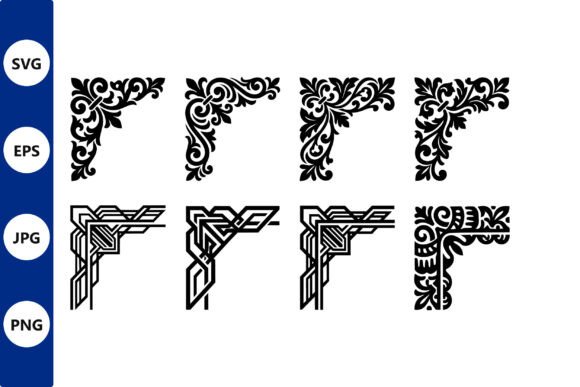
Ornate Corner Design: Elevating Digital Creativity with Elegant Borders
In the vast landscape of digital design, the difference between a standard layout and a captivating visual experience often lies in the details. Ornate Corner Design represents a sophisticated approach to framing content, merging classical aesthetics with modern digital utility. For creators, business owners, and hobbyists alike, understanding how to effectively utilize these decorative elements can transform ordinary projects into professional-grade compositions. This article explores the intricacies of ornate corner motifs, their practical applications, and why they remain a staple in high-quality graphic design.
The Essence of Decorative Framing
At its core, an ornate corner design is more than just a border; it is a structural anchor for visual content. These elements typically feature intricate floral and geometric patterns that draw the eye inward, creating a natural focal point for text, images, or central graphics. The set of black ornate corner motifs discussed here offers a versatile foundation for various creative endeavors. By utilizing high-contrast black designs, users ensure that the decorations complement rather than compete with the primary content.
The appeal of these designs lies in their duality. They are rooted in historical artistry, reminiscent of Victorian bookplates or baroque architectural details, yet they are delivered in formats optimized for contemporary digital workflows. This blend of old-world charm and new-world convenience makes them an invaluable resource for anyone looking to add a touch of elegance to their work without starting from scratch.
Key Characteristics of High-Quality Motifs
Not all digital assets are created equal. When evaluating an Ornate Corner Design package, several technical and aesthetic factors determine its value and usability:
- Vector Scalability: The inclusion of SVG and EPS formats ensures that the designs can be scaled to any size without losing clarity. Whether you are designing a small business card or a large-scale wall mural, the lines remain crisp and clean.
- Clean Optimization: Each design in this collection is individually cleaned up. This means unnecessary nodes and stray points have been removed, making the files easier to edit and manipulate in design software.
- Versatile File Formats: Alongside vector files, the provision of PNG and JPG formats allows for immediate use in applications that do not support vector editing, such as basic word processors or social media platforms.
- Complex Pattern Integration: The combination of floral and geometric patterns provides a rich texture that adds depth to flat designs, offering a premium look that simple lines cannot achieve.
Practical Applications for Creators and Businesses
The versatility of Ornate Corner Design extends far beyond traditional print media. In today’s multi-platform digital environment, these assets serve a wide array of functions. Understanding where and how to apply them can significantly enhance the perceived value of your creative output.
Custom Wall Art and Home Decor
One of the most popular uses for these motifs is in the creation of custom wall art. Interior designers and DIY enthusiasts often seek unique pieces that reflect personal style. By incorporating ornate corners into digital compositions, users can create framed prints that mimic antique engravings or modern minimalist frames with a twist. These designs can be printed on canvas, metal, or high-quality paper, serving as striking focal points in living rooms, offices, or galleries.
Personalized Decals and Stickers
For small business owners specializing in personalized products, ornate corners are ideal for creating custom decals. Whether used for wedding invitations, gift tags, or product packaging, these elements add a layer of sophistication. The black-on-transparent nature of many PNG files allows for easy overlay on colored backgrounds, ensuring the design integrates seamlessly with the brand’s color palette.
Tattoo Design and Body Art
Tattoo artists frequently search for high-resolution reference materials that can be easily modified. The clean lines and intricate details of Ornate Corner Design make them excellent bases for tattoo stencils. Artists can isolate specific floral or geometric components to create custom sleeves or standalone pieces, providing clients with unique, bespoke artwork that stands out from generic flash designs.
Evaluating Suitability for Your Project
While ornate designs are powerful, they are not suitable for every context. Knowing when to use them is just as important as knowing how. Here are some guidelines to help you determine if this asset fits your current needs:
- Assess the Tone: Ornate corners convey elegance, tradition, and formality. They are perfect for wedding stationery, luxury branding, or classic literature covers. However, they may feel out of place in ultra-modern, tech-focused, or playful children’s designs.
- Consider Content Density: If your central content is already highly detailed or text-heavy, adding intricate borders might create visual clutter. Use these motifs sparingly to frame simple, bold statements or minimalistic imagery.
- Check Technical Requirements: Ensure your workflow supports the provided file types. If you are using advanced software like Adobe Illustrator or CorelDRAW, leverage the SVG and EPS files for maximum flexibility. For quick social media graphics, the PNGs will suffice.
Strengths and Limitations
Every design tool has its strengths and considerations. The primary strength of this Ornate Corner Design set is its readiness. The files are pre-cleaned and optimized, saving hours of manual vector tracing and cleanup. This efficiency is crucial for professionals working under tight deadlines.
However, a limitation to consider is the fixed style. While the patterns are versatile, they are inherently decorative and bold. Users seeking subtle, barely-there borders may need to adjust opacity or scale the elements down significantly. Additionally, while the black color is classic, users wanting colored borders will need to apply color changes within their design software, which requires a basic understanding of vector editing tools.
Real-World Scenarios: From Concept to Creation
To illustrate the practical value, consider a small business owner launching a line of artisanal candles. They want their packaging to reflect heritage and quality. By using Ornate Corner Design elements on their labels, they can frame their logo and product name, creating an instant association with luxury and craftsmanship. The vector files allow them to resize the corners perfectly for different jar sizes, maintaining consistency across their product line.
Another scenario involves a digital marketer creating a lead magnet ebook. To make the PDF visually engaging, they use the corner motifs on chapter title pages. This breaks up the text, provides visual rest points for the reader, and elevates the perceived value of the free content, encouraging higher conversion rates.
Conclusion
Incorporating Ornate Corner Design into your creative toolkit offers a straightforward path to enhancing visual appeal. Whether you are a professional designer seeking efficient assets or a hobbyist looking to add polish to personal projects, these motifs provide the structure and elegance needed to stand out. By understanding their characteristics, applications, and limitations, you can make informed decisions that elevate your work. Remember, the goal is not just to decorate, but to frame your message in a way that resonates with your audience. With high-quality SVG, EPS, PNG, and JPG formats at your disposal, the only limit is your imagination.
For those ready to start creating, simply open the files in your preferred software and begin experimenting. The journey from a blank canvas to a finished masterpiece is made smoother with the right foundational elements. Embrace the blend of floral beauty and geometric precision, and let your designs speak with clarity and style.