Makeup Tools Vector Art Line Icons: An Evaluation
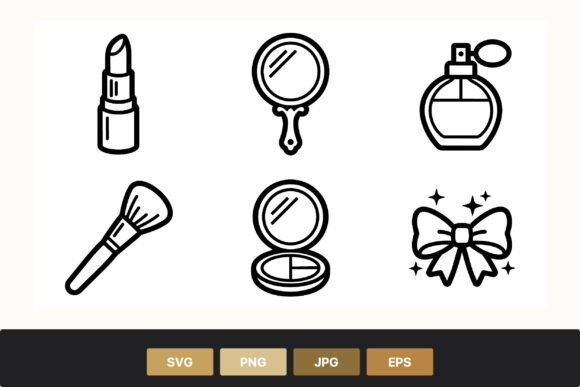
In the realm of digital design, the selection of appropriate visual assets is a critical step that influences the overall aesthetic and functionality of a project. One specific category gaining traction among graphic designers, illustrators, and content creators is the Makeup Tools Vector Art Line Icons. This collection typically features a set of black and white vector art depicting essential beauty items, including a lipstick, hand mirror, perfume bottle, makeup brush, compact powder, and a decorative bow with sparkles. While these icons appear simple at first glance, their utility extends far beyond basic decoration. This article evaluates the practical application, technical specifications, and strategic value of this asset type to help professionals determine if it aligns with their specific workflow requirements.
Defining the Asset and Its Composition
The Makeup Tools Vector Art Line Icons are characterized by a minimalist line-art style. Unlike photorealistic images or heavily shaded illustrations, these icons rely on clean strokes and negative space to convey their subject matter. The specific set in question includes six distinct elements: a lipstick representing color cosmetics, a hand mirror symbolizing personal grooming, a perfume bottle for fragrance branding, a makeup brush for application tools, a compact powder for face products, and a decorative bow with sparkles to add a touch of elegance or celebration.
Technically, these assets are delivered as a compressed ZIP file containing multiple formats: SVG (Scalable Vector Graphics), PNG (Portable Network Graphics), EPS (Encapsulated PostScript), and JPG (Joint Photographic Experts Group). This multi-format delivery is a standard industry practice designed to accommodate various software environments and output needs. The inclusion of SVG and EPS files ensures that the artwork remains editable and scalable without loss of quality, while PNG and JPG versions offer immediate usability for web and print contexts where editing is not required.
Reasons for Interest and Strategic Application
Designers often seek out Makeup Tools Vector Art Line Icons when they require a cohesive visual language for beauty-related projects. The primary driver for interest is the need for consistency. When creating a brand identity for a cosmetic startup, a salon website, or a beauty blog, using a unified icon set ensures that all visual elements speak the same "language." The black and white nature of the line art provides a neutral base that can be easily recolored to match any brand palette, offering significant flexibility.
Furthermore, the specific inclusion of items like the decorative bow with sparkles suggests an intent to bridge the gap between functional tools and celebratory aesthetics. This makes the set particularly useful for packaging designs, holiday marketing campaigns, or social media graphics that aim to evoke a sense of luxury and festivity. For content creators producing tutorials or guides, these icons serve as effective visual anchors to break up text and highlight key steps or products.
Benefits and Technical Advantages
The most significant advantage of this asset package lies in its format versatility. The presence of SVG files allows for infinite scalability. Whether an icon is displayed on a mobile app screen or blown up for a billboard, the lines remain crisp and sharp. This is a crucial consideration for modern responsive web design, where images must adapt to various screen resolutions. Additionally, SVG files are lightweight, contributing to faster page load times compared to raster-based images.
The inclusion of EPS files caters to professional print workflows. Designers working in Adobe Illustrator or CorelDRAW can import these files directly, retaining the ability to edit individual paths, adjust stroke weights, and modify anchor points. This level of control is essential for customizing the icons to fit unique layout constraints. Meanwhile, the PNG files with transparent backgrounds provide a quick solution for overlaying icons onto complex photographic backgrounds without the need for manual masking. Finally, the JPG versions ensure compatibility with older systems or platforms that do not support newer vector formats.
Tradeoffs and Considerations
While the benefits are substantial, there are tradeoffs to consider. The minimalist line-art style, though versatile, may not suit every design context. Projects requiring high detail, texture, or a realistic representation of products might find these icons too abstract. For instance, a high-end fashion editorial looking to showcase the specific texture of a lipstick bullet or the glass reflection of a perfume bottle would likely require 3D renders or high-resolution photography instead.
Another consideration is the initial learning curve for users unfamiliar with vector editing software. To fully leverage the SVG and EPS files, a designer needs proficiency in tools like Adobe Illustrator or Inkscape. If the goal is simply to drop an image into a document without modification, the vector capabilities may go unused, rendering the complexity of the file structure unnecessary. Furthermore, while the black and white default offers neutrality, it requires an extra step of recoloring if the final design demands specific hues, which adds time to the production process.
Situational Fit: When to Use and When to Look Elsewhere
The Makeup Tools Vector Art Line Icons are a strong fit for several specific scenarios. They are ideal for user interface (UI) design, where clarity and scalability are paramount. A beauty e-commerce site could use these icons to categorize products or indicate features in a shopping cart. They are also well-suited for infographic creation, where data visualization requires clean, unobtrusive symbols. Additionally, print materials such as business cards, flyers, and product labels benefit from the sharpness of vector graphics, ensuring professional reproduction even at small sizes.
However, alternatives may be worth considering in other situations. If a project demands a highly stylized, hand-drawn look that differs from the uniform precision of vector line art, custom illustration might be a better choice. Similarly, if the target audience expects a vintage or retro aesthetic that relies on halftone patterns or grainy textures, the clean lines of this set might feel too sterile. For brands that prioritize photorealism to build trust through tangible product representation, stock photography or 3D modeling services would likely yield better results than simplified icons.
Practical Decision-Making Insights
When evaluating whether to integrate this asset into a workflow, decision-makers should ask three key questions. First, does the project require scalability? If the icons will be used across multiple mediums, from mobile apps to large banners, the vector nature of the Makeup Tools Vector Art Line Icons is a decisive factor. Second, is customization necessary? If the design team needs to tweak the stroke width, add brand colors, or combine elements (such as merging the bow with the perfume bottle), the editable SVG and EPS files provide the necessary freedom. Third, does the aesthetic align with the brand voice? The clean, elegant, and slightly whimsical nature of the line art—accentuated by the sparkles and bow—works best for brands positioning themselves as modern, accessible, and stylish.
Ultimately, the value of this resource lies in its balance of simplicity and technical robustness. It removes the barrier of creating icons from scratch while avoiding the limitations of static raster images. By understanding both the capabilities and the stylistic boundaries of the Makeup Tools Vector Art Line Icons, designers can make informed choices that enhance their projects without compromising on quality or efficiency. For those seeking a reliable, flexible foundation for beauty-themed visuals, this set offers a pragmatic solution that supports a wide range of creative and production workflows.